

Most tracking debates start with tools. They should start with risk. If your numbers drift, your teams argue, and your budget decisions turn into guesswork, it is rarely because your dashboards are weak. It is usually because your tracking method cannot keep up with modern browsers, consent choices, and site changes.
If you are weighing server side tracking vs client side, treat it as a design choice, not a trend. The right answer depends on what you need to measure, how much control you need over data flow, and how you plan to respect user preferences. A clear view of server-side tracking vs client-side helps you choose a setup that stays reliable without turning tracking into a black box.
What Client-Side Tracking Means
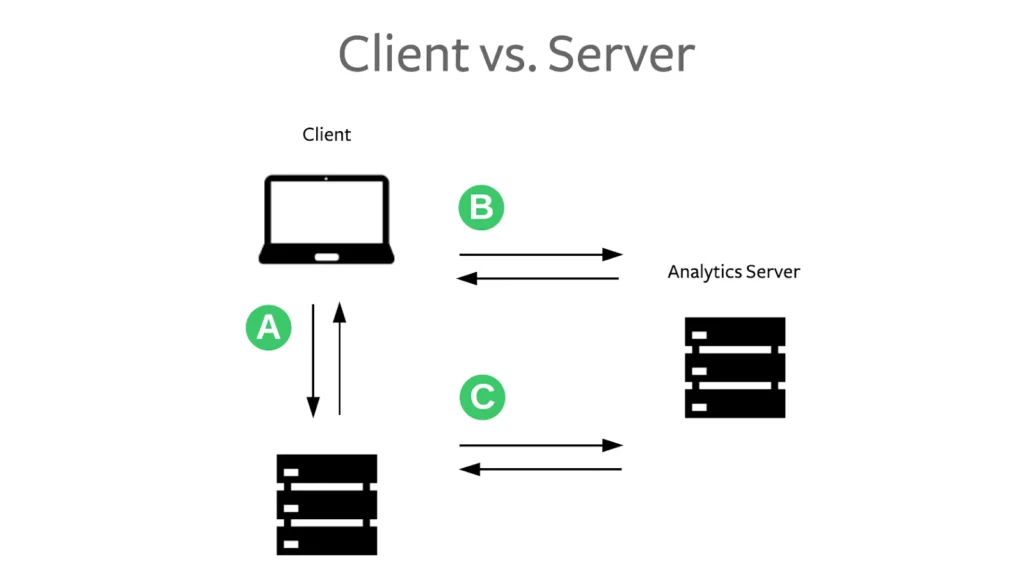
Client-side tracking runs in the user’s browser. When someone visits your site, a script loads and sends events to tools like analytics platforms, ad platforms, or session recording tools.
How It Works In Plain Terms
A page loads. Your tag manager or tracking scripts fire. Those scripts collect data from the browser and send it directly to outside platforms.
What client-side Tracking Is Good At:
Client-side tracking is popular because it is easy to start and easy to iterate.
- It Is Fast To Deploy For Basic Analytics.
- It Works Well For Simple Websites With Limited Tools.
- It Makes It Easy To Track On-Page Interactions Like Clicks And Scrolls.
- It Supports Rapid Experimentation When You Are Moving Quickly.
Where Client-Side Tracking Struggles
Modern environments make browsers less predictable.
- It Can Break When Scripts Fail To Load.
- It Can Be Blocked By Browser Settings Or Extensions.
- It Can Create Inconsistent Counts Across Tools Because Tags Fire Differently.
- It Can Slow Pages Down If Too Many Scripts Run At Once.
Client-side tracking is not “bad.” It is simply more exposed to conditions you do not control.
What server-side Tracking Means
server-side tracking routes events through your own server or a managed server endpoint before they reach third-party tools.
How It Works In Plain Terms
Instead of sending data straight from the browser to multiple platforms, your site or backend sends events to your server endpoint. That endpoint then forwards the events to destinations you approve, using rules you control.
What server-side Tracking Is Good At
Server-side tracking improves control and consistency for high-value events.
- It Can Reduce Lost Conversion Events When client-side Tags Fail.
- It Can Standardize Event Formats Before Data Goes Out.
- It Can Improve Performance By Reducing Heavy Browser Scripts.
- It Can Give You Cleaner Routing Control Across Multiple Tools.
Where server-side Tracking Requires More Discipline
Server-side tracking is not a shortcut. It introduces responsibilities.
- It Requires Strong Governance On What Data Is Collected And Sent.
- It Needs Clear Consent Enforcement So You Do Not Route Data Improperly.
- It Often Needs Engineering Support To Set Up And Maintain.
- It Can Become Opaque If Teams Cannot Inspect What Was Sent And Why.
A good server-side setup stays transparent. A weak one turns into a mystery pipeline.
Server-Side Tracking vs. Client-Side Tracking: The Core Differences
The decision becomes easier when you compare them across practical dimensions, not marketing claims.
Reliability
Client-side tracking depends on scripts running in the browser. Server-side tracking depends on your endpoint and your routing rules.
In many setups, server-side is more reliable for conversion events because it is less exposed to browser limitations. Client-side can still be reliable for lighter interactions when scripts load consistently.
Control Over Data Flow
Client-side tracking often sends data directly to vendors, sometimes with limited ability to filter and standardize. Server-side tracking gives you a central point where you can decide what is sent, to whom, and under which rules.
Speed Of Iteration
Client-side tracking can be faster for marketing teams because it often involves tag changes rather than backend work. Server-side tracking can still support fast iteration, but it usually needs clearer processes and testing.
Performance Impact
Client-side tracking can add page weight and script overhead. Server-side tracking can reduce this by moving some work off the browser. The impact depends on how many scripts you are running today.
Privacy And Consent Enforcement
Both approaches must respect consent. Server-side tracking can make enforcement more consistent because you can centralize routing rules. Client-side tracking can also enforce consent, but it is easier for tags to drift over time if governance is weak.
The key point is simple. Server-side tracking does not remove privacy obligations. It can make compliance easier when done responsibly.
When client-side Tracking Is The Better Choice,
client-side tracking is often the right default when your needs are straightforward.
You Need A Fast Setup With Minimal Engineering
If your team needs tracking quickly and your site is not complex, client-side can be the practical choice.
You Mainly Track On-Page Behavior
If your main goal is measuring page views, content engagement, and basic interactions, client-side tracking usually covers it well.
Your Risk Is Low If A Few Events Drop
If missing a small portion of events will not change budget decisions, client-side tracking can be sufficient.
You Have Strong Tag Governance
If you have clean naming rules, consistent event definitions, and careful publishing controls, client-side setups can stay stable.
When server-side Tracking Is The Better Choice
server-side tracking is often worth it when accuracy, control, or consistency has a clear business impact.
You Cannot Afford to Lose Conversion Events
If your budgets and forecasts depend on accurate conversions, server-side tracking can reduce the risk of lost signals.
You Have Multiple Destinations With Conflicting Event Definitions
If analytics, ads, and CRM tracking do not match today, server-side routing can help standardize events before they go out.
You Need Better Control Over What Data Goes Where
If you want to minimize data leakage and keep destinations limited to what they need, server-side tracking gives you a strong control point.
You Want A Clear Path In A Cookieless World
If you are strengthening first-party measurement and want reliable conversion tracking even as visibility changes, server-side tracking is a strong foundation.
The Hybrid Approach Most Teams Actually Need
The most realistic answer is often not either-or. Many teams run a hybrid setup.
Keep client-side For Lightweight Interactions
Use client-side tracking for interactions that are useful but not critical, such as button clicks, page engagement, and content events.
Use server-side For High-Value Outcomes
Use server-side tracking for events tied to money and core decisions, such as purchases, upgrades, qualified leads, and demo bookings.
Standardize Event Naming Across Both
A hybrid model only works if you use one event plan and consistent naming. If you treat the two layers differently, reporting becomes chaotic.
What To Look For In A Good Implementation
A tracking method does not fix bad design. Implementation quality is what decides whether your data becomes clearer or noisier.
Define A Small Set Of Core Events
Start with a short list of high-value conversion events. Make those reliable before tracking every interaction.
Capture Source Context Early
If you want to connect spend to outcomes, you need a stable source capture. Store campaign context in first-party systems and pass it into conversions.
Enforce Consent Rules End To End
Decide what happens when users opt out. Then enforce those rules consistently in both client-side tags and server-side routing.
Make Debugging Easy
Your team should be able to answer two questions quickly. What fired. And where did it go?
Look for a setup that supports:
- Clear Logs For Event Delivery.
- Testing Environments Before Production Changes.
- Version History And Rollback For Routing Rules.
Keep Data Minimization In Focus
Send only what is needed. A cleaner event payload is easier to govern, easier to explain, and safer to maintain.
Common Mistakes To Avoid
Mistake One: Moving Everything Server-Side Immediately
Start with high-value conversions first. Expand only when the foundation is stable.
Mistake Two: Treating Server-Side Tracking Like A Consent Bypass
Consent still governs what should be collected and routed. Server-side tracking should strengthen enforcement, not weaken it.
Mistake Three: Letting Multiple Teams Define Events Differently
Create one shared event dictionary. Assign ownership. Enforce naming and property standards.
Mistake Four: Ignoring Ongoing Ownership
Tracking breaks when nobody owns it. Assign owners for event definitions, routing rules, and reporting logic.
How To Decide Without Overthinking It
If you want a simple decision rule, use this.
Choose client-side Tracking When
- You Need Speed And Simplicity.
- You Mainly Track Engagement And Basic Conversions.
- You Can Tolerate Some Data Loss Without Impacting Decisions.
Choose server-side Tracking When
- You Need Reliable Conversion Tracking For Budget Decisions.
- You Want Stronger Control Over Data Routing And Governance.
- You Are Fixing Reporting Drift Across Multiple Tools.
Choose A Hybrid Setup When
- You Want client-side Flexibility With server-side Reliability For Core Events.
- You Need Both Product And Marketing Measurement To Stay Consistent.
Why This Choice Impacts Trust More Than Reports
Tracking is not just measurement. It is credibility. When teams do not trust the data, they stop making confident decisions. They spend defensively. They argue instead of acting.
A strong choice in server-side tracking vs client-side reduces that friction. It makes conversions more stable, event definitions more consistent, and privacy enforcement easier to manage. That is what turns tracking into a system people rely on, not a system people avoid.
FAQs
1) What Is client-side Tracking
Client-side tracking collects and sends events from the user’s browser to analytics and marketing tools. It is easy to deploy, but it can be affected by script failures, browser limits, and extensions.
2) What Is server-side Tracking
Server-side tracking routes events through your own server or server endpoint before sending them to destinations. It can improve control and reliability for key conversion events.
3) Does server-side Tracking Replace The Need For Consent
No. Consent rules still apply. Server-side tracking can make consent enforcement more consistent, but it is not a bypass.
4) Should I Move All Tracking server-side
Not usually. Many teams use a hybrid model. They keep lightweight engagement tracking client-side and move high-value conversions server-side.
5) What Is The Fastest Way To Get Value From server-side Tracking
Start with one or two high-value conversion events. Validate them against the backend truth. Then expand once routing, consent enforcement, and reporting are stable.